Jenny
A local-first personal AI agent that lives on your Android phone.
It remembers you permanently, keeps a notebook for each thing you care about, acts on a schedule without being asked, writes its own mini-apps on request, and can be your phone's home screen. Your memory, files and conversations stay on the device. Bring your own API key — or run a model on your own hardware and keep the whole loop offline.


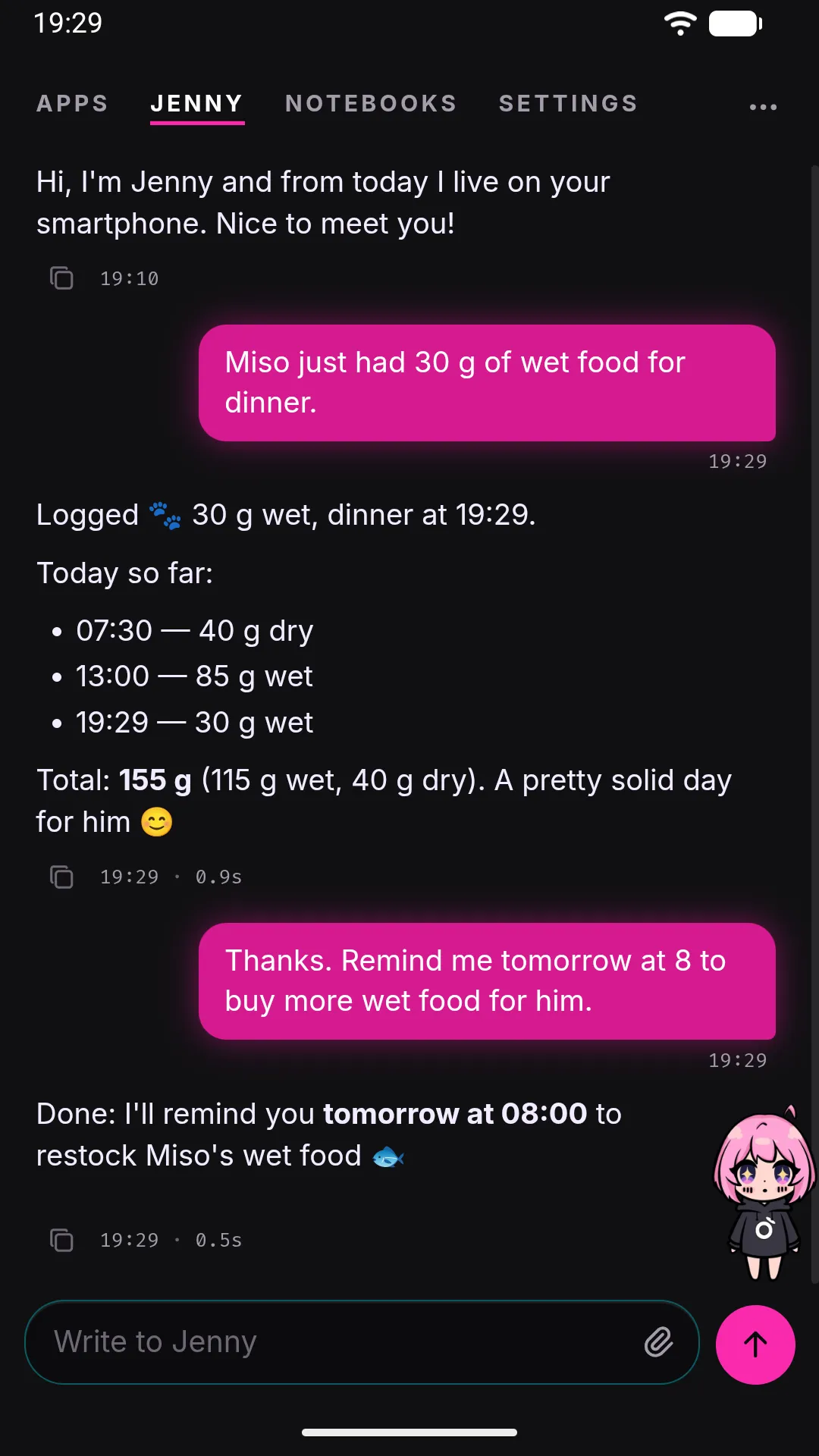
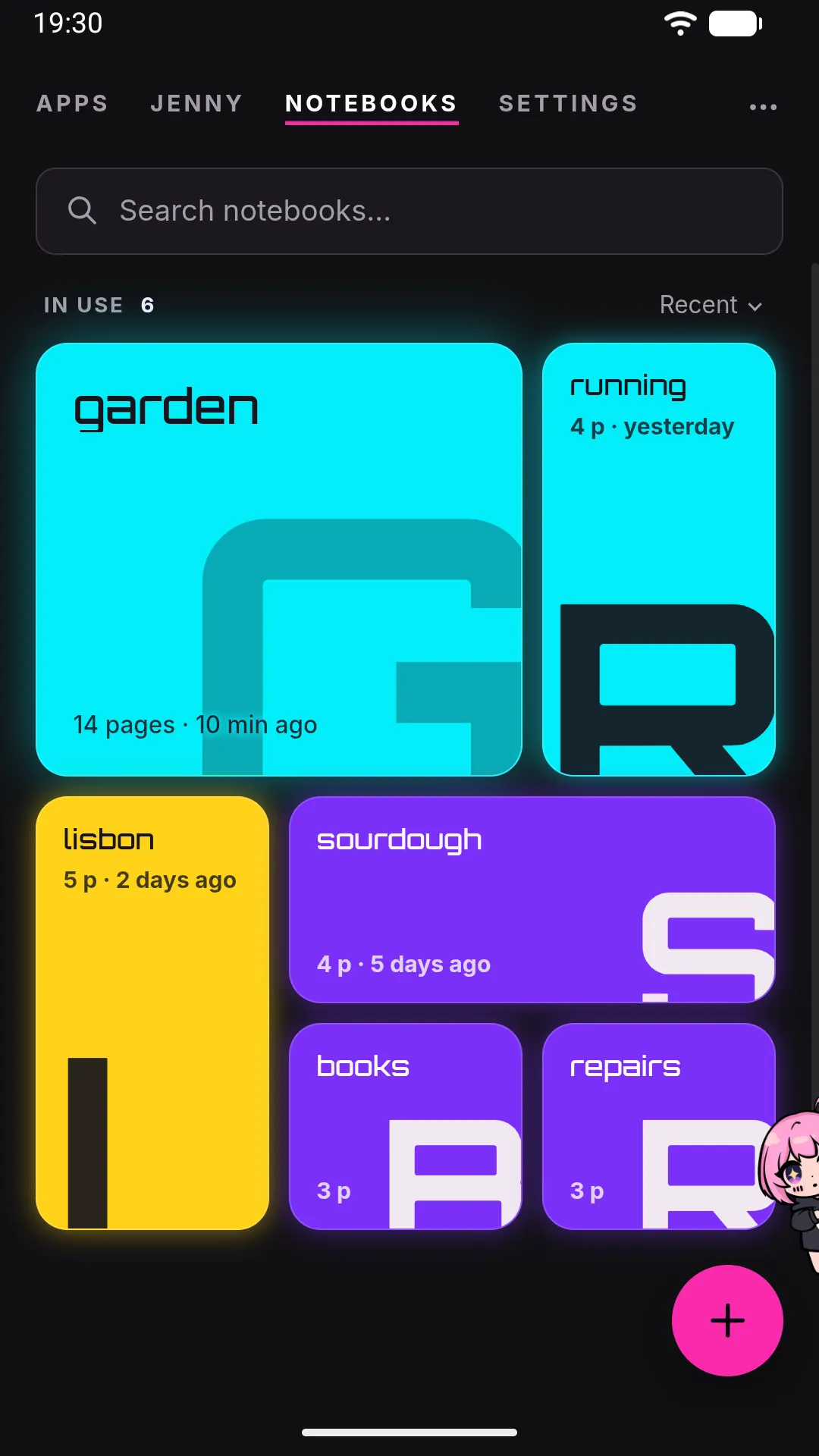
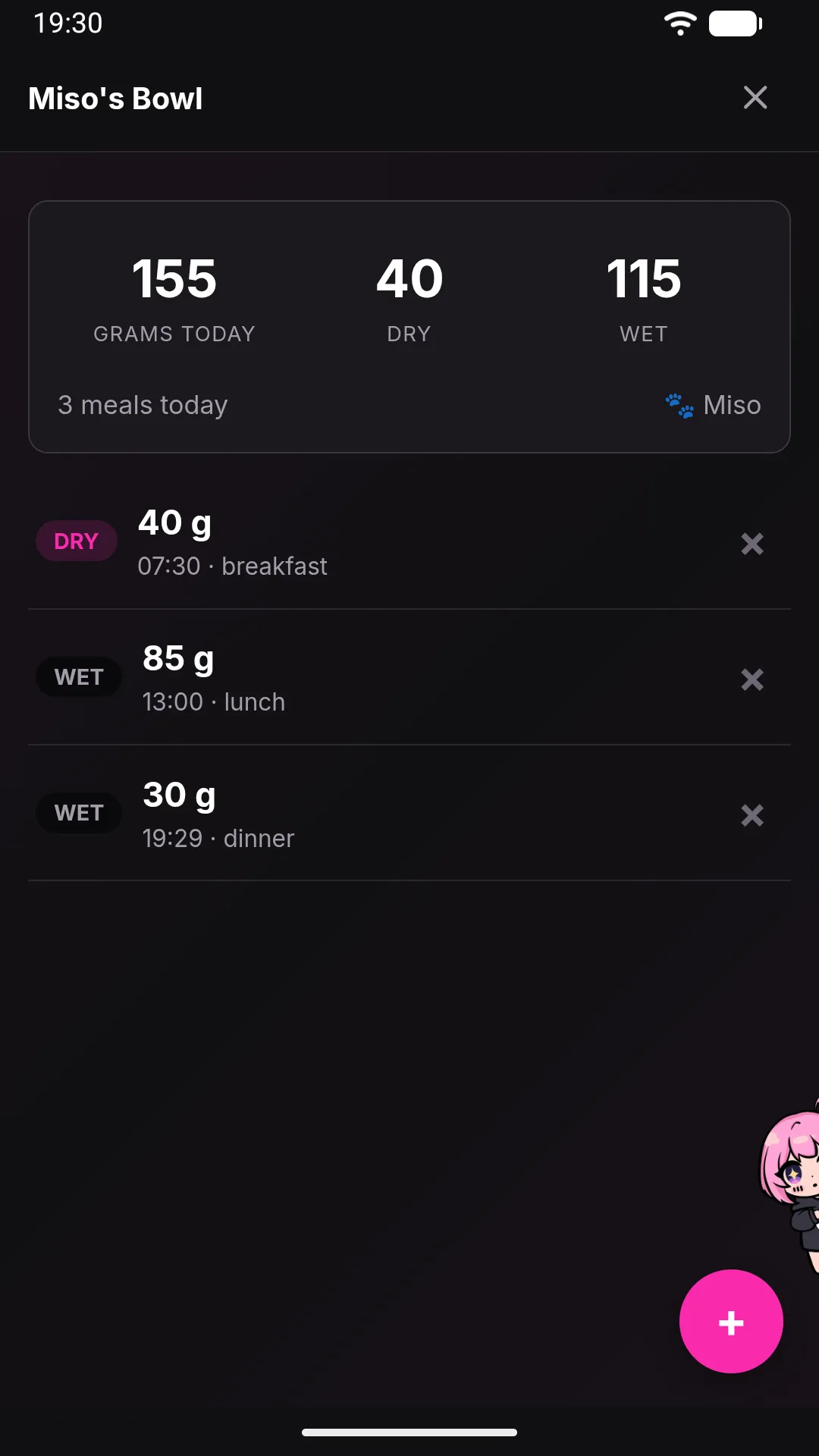
Captured on the Android emulator (1080×1920), with invented data. Unretouched framebuffer grabs; only the status bar is in Android's demo mode.
Why local-first
Mainstream assistants are guests, not hosts
They live in an app among many, forget you between sessions, and send your life to someone else's servers. Jenny inverts all three.
Presence
It can be the home screen. Apps live inside the assistant, not the reverse.
Continuity
One conversation that never resets, backed by structured on-device memory that gets better the longer you use it.
Ownership
No account, no sign-up, no telemetry, no subscription, no server of ours in the loop. Your key, your model, your storage.
| Cloud assistant (ChatGPT, Gemini, Siri) | Self-hosted agent on a VPS | Jenny | |
|---|---|---|---|
| Where your data lives | the vendor's servers | your server, your ops burden | the phone in your pocket |
| Memory across sessions | limited, vendor-controlled | whatever you build yourself | permanent, on-device, plain Markdown |
| Acts while you're not looking | no | if you wire it up | built in |
| Recurring hardware cost | free tier, then a subscription | monthly | a phone you already own |
| Model choice | the vendor's | yours | yours — 40+ providers, or local |
| Works with no internet | no | no | yes, with a local model on your LAN |
| Setup effort | none | real | install an APK, paste a key |
Notebooks · the board
A notebook for each thing you care about
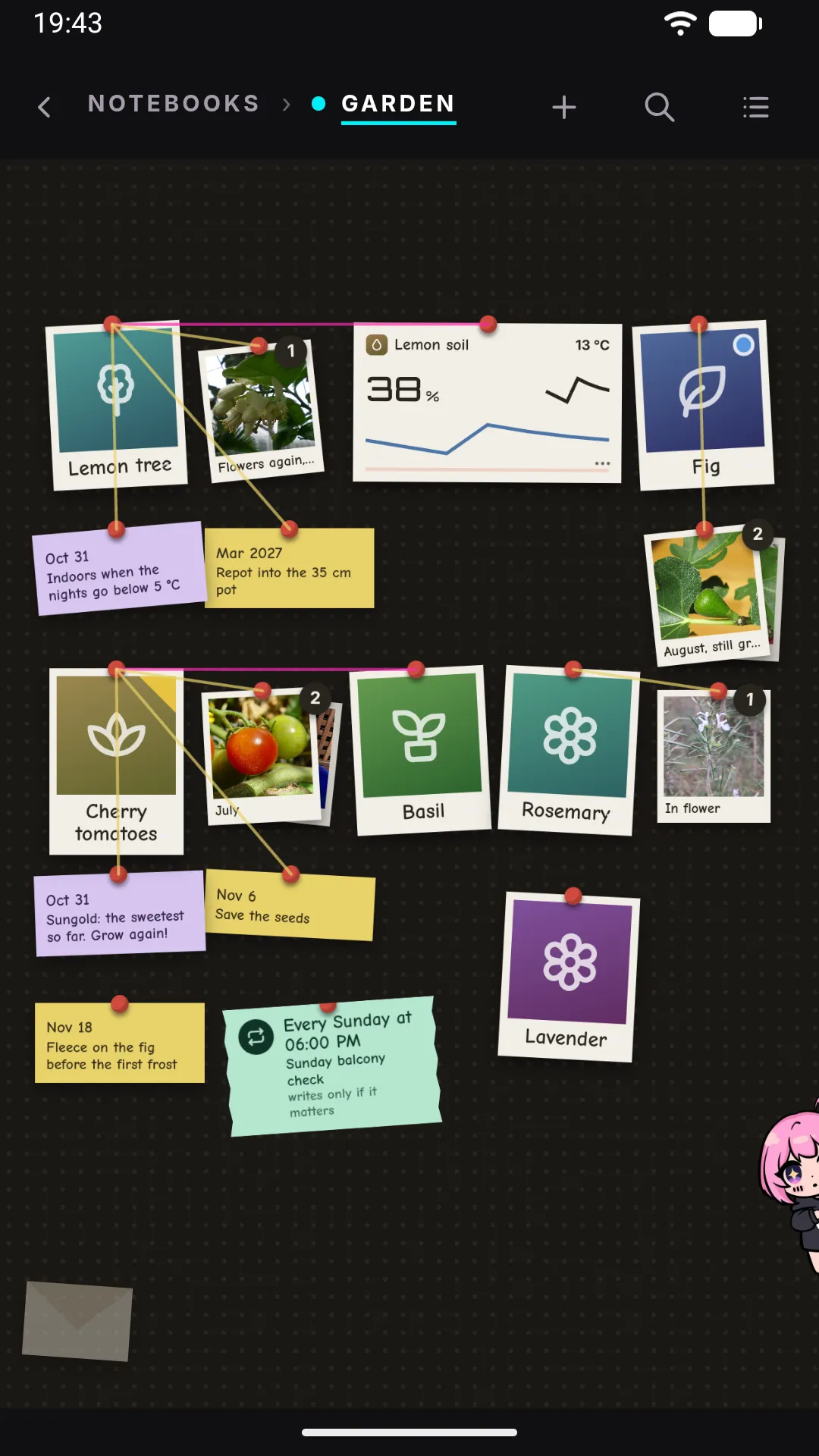
The plants on the balcony, a trip, the house. A notebook has its own chat, and what you tell it is written down as pages. It opens on a board you arrange: a card for each subject, its photos and notes beside it, reminders on yellow sticky notes, the apps that belong to it — a soil sensor, a log — right on the wall.
Jenny proposes, you move. The pages stay plain Markdown on the phone, and a background gardener keeps them and the board current.
Plans · helpers you can stop
Big jobs become plans you approve
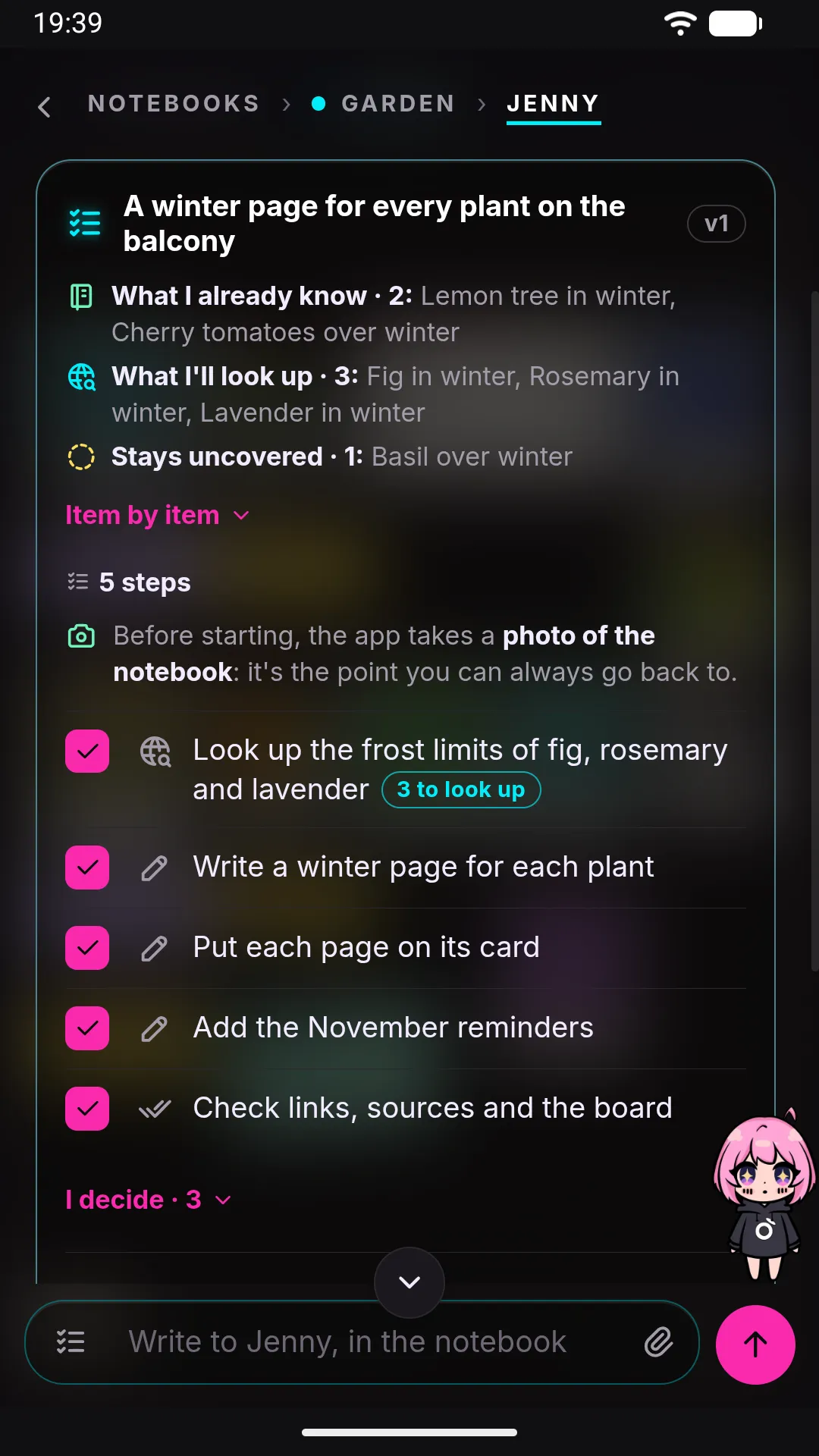
Ask for something too big for one answer and press Plan. Jenny reads the notebook, asks what she needs, and proposes the steps — what she already knows, what she'll look up. Nothing moves until you approve. Then the app runs one step at a time, photographs the notebook first, and can put it back as it was.
The work itself goes to her helpers, mini-mes you see in the chat. Stop one, and every file it changed that nobody touched since goes back.
Permanent on-device memory · "Dream"
It gets better the longer you use it
Every couple of hours, a background pass replays the recent conversation and distills it into structured files on disk. Noise is pruned, signal accumulates — and it's plain Markdown on the device, so switching model provider doesn't cost you your memory.
What it can do
It acts on its own — and it writes its own apps
Time and initiative
Reminders, one-shot scheduled actions, recurring jobs ("every Monday, summarise my week"). When one fires, it messages you first, screen off.
Files and documents
Read, write, organise and edit inside a workspace, with a real file browser and an editor in the UI.
It writes its own mini-apps
Describe one in chat — "something to track my plants" — and it builds the UI, storage and a callable tool, so cron can act on it later.
It can be your launcher
HOME + DEFAULT + LAUNCHER, seven visual themes, an animated mascot. Judged purely as a launcher it would be a bad one — the launcher is the how, not the what.
Daily launcher
Your main phone's home screen becomes the agent. This is the whole point: presence, memory, proactivity, all day.
Dedicated device
A spare Android on your desk becomes an always-on AI device. Zero-risk trial: always powered, battery is a built-in UPS, own screen, already paid for. Open it from your laptop over Tailscale, or reach it through the optional Telegram bridge.
The one honest exception to local-first
If the agent lives on a phone on your desk, connect your own Telegram bot token and its proactive messages reach wherever you are. Messages routed through the bridge pass through Telegram's servers — your memory, files, conversations and generated apps do not, whether the bridge is on or off. Off by default, and it requires an explicit pairing step.
Privacy
Every outbound connection Jenny can make
Not "we promise not to look" — there is nowhere for us to look from. No account, no sign-up, no telemetry, no analytics SDK, no crash reporter, no server of ours. The claim is checkable in the code, and so is the one automatic request: a daily look at GitHub for a new version.
- Your configured LLM provider. Messages, session history, tool results, and any workspace file the agent reads — plus your last-known location, on every turn, if location sharing and the Android permission are both on.
- Bing. Your web_search queries, only when the agent actually calls the tool. The engine is fixed to Bing — there's no picker.
- Sites reached by web_fetch / download_file. Whatever a normal visit reveals: a real, hidden WebView with the phone's own IP, user-agent and cookies.
- api.telegram.org. Only if you paired a bot. Off by default. Your conversation transits Telegram's servers under Telegram's terms.
- GitHub Releases. Once a day, a plain request for the latest version's manifest: no identifier, nothing about you. It has its own switch.
- The SSH hosts you registered. The commands the agent runs there, and the files it uploads. Off by default, and only for machines you added yourself.
- Your Google Drive — Play Store build only. An encrypted copy of the workspace, if you turn it on, readable only with a password you choose and nobody stores. The GitHub build has no code for it.
The caveat we won't hide
Your provider API keys sit in config.json in plain text, protected by Android's app sandbox and nothing else. And anything in Jenny's workspace that the agent reads can end up in the context sent to your provider: there is no private corner inside it. Android's own cloud backup takes nothing from Jenny; to move to a new phone, use her encrypted backup or the phone-to-phone transfer.
Full privacy model, with every gating condition → · Security model →
Security, without a discount
Four containment levels — one of them real, three of them guards
Jenny reads and writes files, executes Python, fetches from the network and acts on a schedule while you're not watching. Pretending that's risk-free would be the fastest way to lose your trust.
- Only the Android app sandbox is OS-enforced. The other three levels — the workspace boundary, the SSRF filter, and
python_exec's module guardrails — are application code, not a jail. The code says so in as many words. python_execis not a sandbox. It runs arbitrary Python in-process, on the same interpreter as the gateway. If you don't trust the model you're running, turn it off.- Provider API keys are stored in plain text in the workspace config, protected by the app sandbox — and, being a workspace file, readable by the agent's own file tools.
- Prompt injection is not solved. Nobody's is. Tool-level guards limit the blast radius; they do not stop a model from being talked into a bad call.
SECURITY.md — the real trust model, every level, and the known limitations →
Bring your own key
40+ providers, two real integrations
First-run onboarding is a short wizard: pick a provider format, paste a key, choose a model. Under the hood there are only two real integrations — an Anthropic-format client and an OpenAI-compatible one — and every catalog entry is a preset on top of one of them.
That's the useful part: anything speaking either API works, including something that ships after this page. Point it at Ollama or LM Studio on your own LAN and the whole loop runs offline — no request ever leaves your network.
Seven themes, one agent
Try a theme on this page
An animated mascot who is the door to the chat — tap her anywhere and the conversation comes up — and a full visual identity underneath her, not just an accent color swap.
Seven built-in themes, chosen from the same Settings screen as everything else. This button row previews them on this page — the app itself has the full picker with live thumbnails.
Quick start
Download it and install it
Jenny is not on the Play Store: the signed APK is on GitHub Releases, with its SHA-256 in the release notes. Android 8.0 or newer, about 72 MB — most of it the Python runtime that runs inside the app.
# download jenny-<version>.apk from the latest release, then
shasum -a 256 jenny-<version>.apk   # the same hash as in the release notes
adb install jenny-<version>.apk     # or open the file on the phone
Then: launch, follow onboarding, paste your API key. Optionally set it as your default launcher. No account to create, at any point. Rather not run someone else's binary? Build it from source.
Is it for you?
Probably yes
- You want an assistant that actually remembers you.
- You have a spare Android phone doing nothing.
- You'd rather hold your own API key than rent a subscription.
- You enjoy reading the source of things you run.
Probably not
- You want a polished one-tap install today.
- You're on iOS.
- You want a feature-complete launcher.
- You need something audited and hardened to run models or content you don't trust.
FAQ
Questions, answered plainly
Is this a launcher like Nova or Niagara?
No — the launcher is the how, not the what. Jenny is a personal AI agent; being the home screen is what makes it present instead of an app you remember to open.
Can I use it from my laptop?
Yes, over Tailscale: turn on From other devices in the workshop and open the link on your laptop or a second phone. The phone stays the server, and only your own Tailscale devices can reach it — never the home Wi-Fi. The optional Telegram bridge is the other way to reach it from anywhere.
Does it really work offline, with local models?
Yes — Ollama and LM Studio through the OpenAI-compatible engine. With the model on your LAN and the bridge off, no traffic leaves your network at all. Expect quality to track the model.
What does it cost?
The app is free and open source. You pay your provider directly, or nothing with a local model. There's no incentive to ration your usage — that's architectural, not a pricing promise.
Why AGPL, if it never touches a server?
So a hosted fork can't take the work closed. Personal use is unaffected.
Is my data really on the device?
Yes, with one disclosure worth hearing directly: your prompts go to whichever model provider you chose, along with anything the agent reads to answer them. Every other outbound connection is listed, with its switch, in the privacy section above.
Is there a downloadable APK?
Yes: the signed APK is on GitHub Releases, with its SHA-256 in the release notes so you can check it before installing. Building it from source is still documented in the install guide.
Two promises
On the record, so they can be held against us
BYOK is free, forever
Using Jenny with your own key will never require a subscription, an account, or a payment to us. If a managed tier ever exists for people who don't want to handle API keys, it will be an addition, never a replacement.
Local-first, forever
Your data living on your device is the architecture, not a launch feature. Don't trust that sentence — check the permissions and the source. That's why they're public.